Evanescent
Evanescent — Remember what matters, naturally
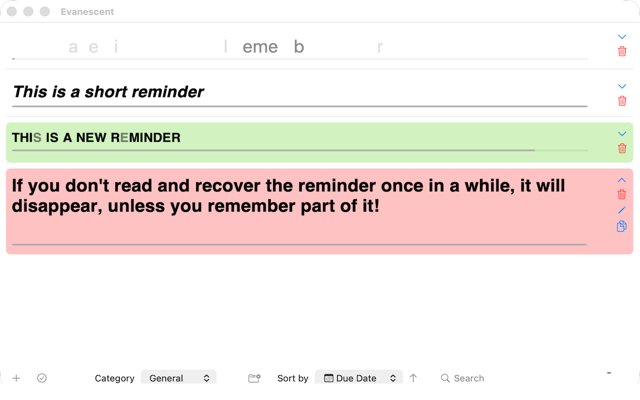
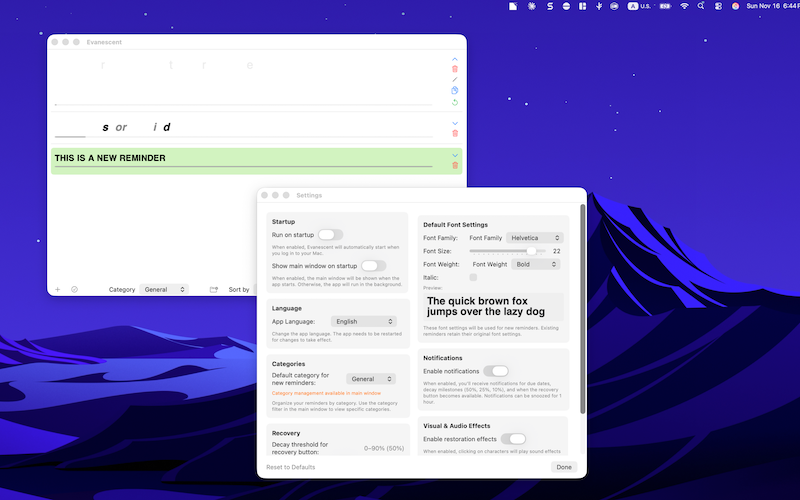
Evanescent is a delightfully simple macOS app that helps you remember important notes through gentle, visual decay. As time passes, words fade. A quick click on faded words restores them — reinforcing recall without pressure.
Why it works
- Natural decay: Text gradually fades to nudge timely review
- Effortless recovery: Click anywhere within a faded word to restore the whole word
- Active recall options: Recover via quick questions or a built‑in memory card game
- Smart nudges: Optional lightweight popups that respect your focus and schedule
- Truly international: Full support for English, French, and Spanish
Core features
Decaying reminders
- Word‑level visual decay over time; fully visible words count toward your visibility percentage
- Quick glance progress bar per reminder
- Sorting by due date, creation date, or decay level; fast text search
- Organize reminders into custom categories for better management
Click‑to‑recover
- Click anywhere on a faded word to restore the entire word (no more pixel‑perfect clicks)
- Double-click on any reminder to expand/collapse for quick access
- Smooth visual feedback with subtle animations and optional sound effects
Recovery workflows
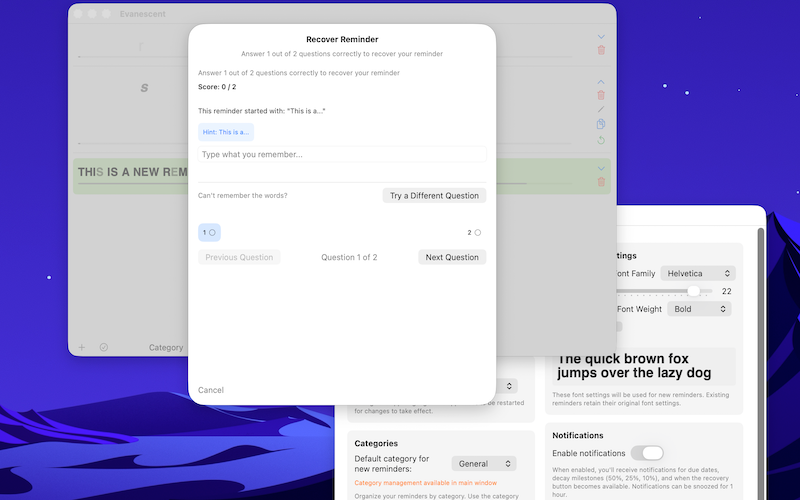
- Answer questions generated from your reminder to recover it
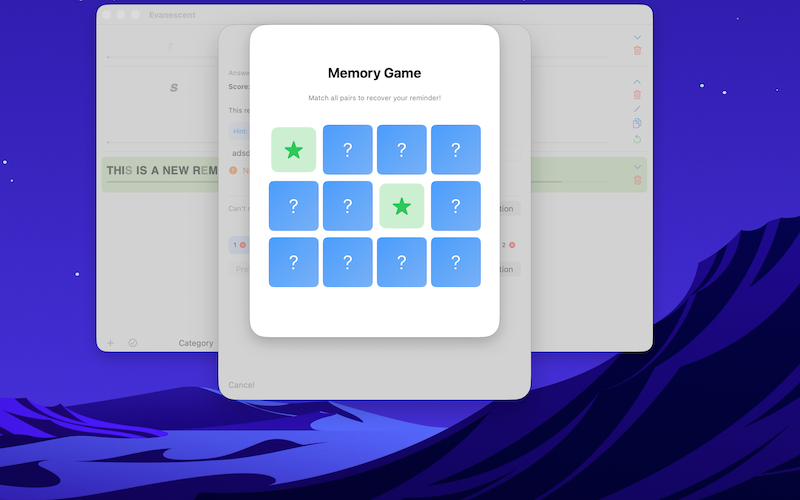
- Memory Card Game: A short, fun matching game as an alternative recovery path
- Auto‑close on success, or continue immediately
Smart engagement popups (optional)
- Per‑reminder frequency: Frequent (randomly throughout the day), Daily, Occasional (every 2–4 days), or Off
- Polite by design — popups are skipped when:
- The main window is already active
- Your screen is locked
- You've been idle > 15 minutes
- It fired less than 1 hour ago for that reminder
- If skipped, the popup is rescheduled ~30 minutes later
- Improved desktop switching: popups reliably bring the main window to front
Powerful editing and management
- One‑click edit when a reminder is ≥ 95% visible
- New: Selection mode with bulk actions
- Select/Deselect All
- Delete (N) with confirmation
- Inline delete, expand/collapse, and keyboard shortcuts
Category organization
- Create unlimited custom categories to organize your reminders
- Filter by category in the main window or view all at once
- Set a default category for new reminders
- Easily manage categories: add, rename, or delete from toolbar or Settings
- When deleting a category, reminders are automatically moved to "General"
- Notifications automatically switch to the reminder's category when clicked
- Category filter persists across app sessions
Personalization
- Default font family, size, weight, and italics
- Customizable background colors per reminder for better organization
- Visual effects (sound + particles) toggle
- Recovery threshold slider (0–90%) to choose when the "Recover" button appears
- Language selection: English, French (Français), or Spanish (Español)
- Instant app restart when changing languages for immediate effect
Local-first, privacy-friendly
- Your reminders are stored locally on your Mac
- No accounts, no trackers
International support
- Full localization in English, French (Français), and Spanish (Español)
- All UI elements, notifications, and recovery questions translated
- Switch languages instantly with automatic app restart
How it feels day to day
- Add what you want to remember
- Let it gently fade with time
- When you return, click faded words to bring them back — or use a quick recovery game
- Optional popups keep you engaged without interrupting your flow
Frequently asked questions
- Do I need the app open to decay reminders?
No. Evanescent keeps time and resumes the correct decay state when you return. - Can I turn off popups?
Yes. Set a reminder's frequency to Off, or manage defaults in Settings. - Will clicking small words be difficult?
Not anymore — clicking anywhere within the word restores the whole thing. - Can I organize reminders with colors?
Yes. Each reminder can have a custom background color for better visual organization. - Can I organize reminders into categories?
Yes. Create custom categories and filter reminders by category. The "General" category is available by default. - Which languages are supported?
English, French (Français), and Spanish (Español) with full UI and notification localization. - What macOS version do I need?
macOS 14 or later is recommended.
Getting started
- Download and install Evanescent
- Add your first reminder
- Pick an engagement frequency (optional)
- Watch your memory get sharper with gentle repetition
Support
Questions or feedback? We’d love to hear from you.
- Email: evanescent@paulogarcia.com
© 2025 Paulo Garcia. All rights reserved.
Privacy Policy - https://paulogarcia.com/evanescent-privacy-policy/